Home Surveillance for Australian Pet Owners
A home pet camera is an indoor Wi-Fi device that lets you check on your animal during the hours you are out of the house. At its best it helps you spot trouble early, confirm your pet has settled, and stop guessing about the quiet parts of the day. It will not replace proper pet care, and in an Australian summer the real worry is often heat and smoke risk rather than a barking dog. The setup that works is a mix of pet comfort, sensible camera placement, and a few privacy and security basics that apply to any internet-connected device.1, 2
What a good pet monitoring setup looks like
Most households do well with one dependable indoor camera in the main living area, plus an optional second view of the entry you actually use. The aim is simple coverage, not constant surveillance. Look for these essentials:
- Clear video in ordinary light so you can read posture, movement, and hazards on the floor.
- Night vision for after-dark check-ins.
- Two-way audio if you need to interrupt a behaviour or talk to someone at home. Use it sparingly, as some animals find sudden voice playback confusing.
- Reliable alerts for motion or sound, with sensitivity you can tune so you are not pinged all day for a moving curtain.
- Storage you understand (a cloud subscription versus a local microSD card), and a simple way to export a clip when you need it.3
Dedicated pet cameras
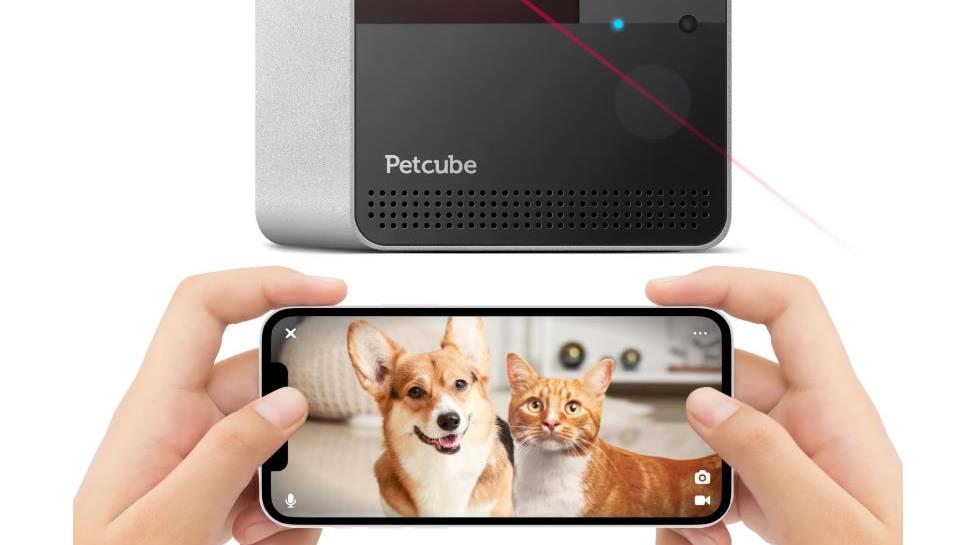
Pet cameras are really indoor Wi-Fi cameras with a few pet-specific extras: treat tossing, barking notifications, and wide views that keep a wandering animal in frame. They can be helpful, though they add moving parts and, sometimes, another subscription. When choosing one, look past the brand name and focus on practical details:
- Treat dispenser design: easy to clean, hard for a determined dog to tip, and not prone to jamming.
- App controls: quick live view, easy volume control, and clear notification settings.
- Placement options: stable on a bench or securely mounted, with the lens angled down enough to see the floor.
If you use treat tossing, keep it predictable and low volume. Treats can support a calm alone-time routine, but they should not become the only thing that keeps an animal settled.4
Standard indoor security cameras
A straightforward indoor pan-and-tilt or fixed camera is enough for most pets, and it often costs less than a pet-branded device while still giving you the essentials: live view, night vision, motion alerts, and two-way audio. Before you buy, check where recordings are stored and what it costs after any free trial. Many cameras are cheap upfront because ongoing cloud storage is where the real cost sits.3
Motion sensors and no-go zone alerts
Motion detection is handy for quick reassurance that movement happened and the house is not silent, but it is less useful for pets than people expect. Animals roam, curtains move, and light shifts, so alerts can turn into background noise. If your aim is to keep pets out of specific rooms, start with physical management first: baby gates, closed doors, and secure bins. Then use camera activity zones or motion alerts to confirm the setup is working, rather than trying to police your pet remotely all day.
Wearable trackers and pet monitors
A camera tells you what is happening in one place. A GPS tracker helps when the concern is where the animal has gone, particularly for dogs that escape yards. These devices vary widely in battery life, coverage, and subscription costs, so treat them as a separate decision from indoor monitoring. For many households the simplest safety upgrade is still the old-fashioned one: secure fencing, working latches, and an ID tag with microchip details kept up to date.
What a camera can realistically tell you
- Early warning: you may notice hazards sooner than you otherwise would, such as spilled water near power boards, a chewed cord, or a pet stuck in a room.
- Behaviour clues: pacing, repetitive barking, hiding, or long periods of rest give you a clearer picture of how your pet copes alone. If you are seeing distress, that is a signal to change the routine, not to buy more tech.4, 5
- Emergency context: if there is smoke nearby, a storm, or a power outage, a quick look helps you decide whether to head home or ask a neighbour to check in, without taking risks you cannot undo.6, 7
Privacy and placement
Indoor cameras are easy. Outdoor or window-facing cameras are where people run into trouble with neighbours and boundaries.
- Aim cameras at your own property and use privacy masking if the app supports it.
- Be cautious with audio recording. Laws differ by state and territory, and audio is generally treated more strictly than video.2, 8
- If you live in strata, check the by-laws before mounting anything in common areas.2
The Office of the Australian Information Commissioner notes that the federal Privacy Act generally does not cover cameras used by individuals in a private capacity, but state and territory surveillance laws may still apply, and the practical answer is usually to adjust the angle if a neighbour is concerned.2
Security basics for any Wi-Fi camera
A pet camera is still a networked device in your home. Set it up the way you would set up a new router: carefully, once, and then keep it updated.
- Change default passwords and use a strong, unique passphrase.
- Turn on two-factor authentication if the camera account offers it.
- Keep firmware and apps updated, and remove devices you no longer use from the account.9
Final thoughts
The best pet monitoring is quiet and practical: a calm routine before you leave, a safe space at home, and a camera that lets you check in without fuss. If the footage shows ongoing distress or unsafe behaviour, that is useful information. It is telling you the routine needs changing, whether through more enrichment, a midday visit, or help from a trainer or your vet, rather than a sharper lens.
References
- RSPCA Australia, Preparing your pet for the easing of COVID-19 restrictions (helping pets adjust to being alone, enrichment)
- Office of the Australian Information Commissioner (OAIC), Security cameras (privacy and residential camera guidance)
- CHOICE, What to know before buying a security camera (storage, cloud versus local considerations)
- RSPCA Australia, Helping your dog cope with the end of the holidays (settling dogs at home alone)
- RSPCA Australia, Separation anxiety in dogs (signs and management)
- Country Fire Authority (Victoria), Pets and bushfires (planning, leaving early, pet emergency kit)
- RSPCA South Australia, Leaving your pets safely in an emergency (safe room guidance, separation of animals)
- ABC News, Are your neighbours allowed to use surveillance cameras? (overview of Australia's patchwork of privacy and surveillance rules)
- Australian Cyber Security Centre, Securing your devices (updates, passwords and general device security)

Dog lover and writer at My Pets Australia, sharing practical breed guides and care advice for Australian pet owners.